ACL(Access Control List)
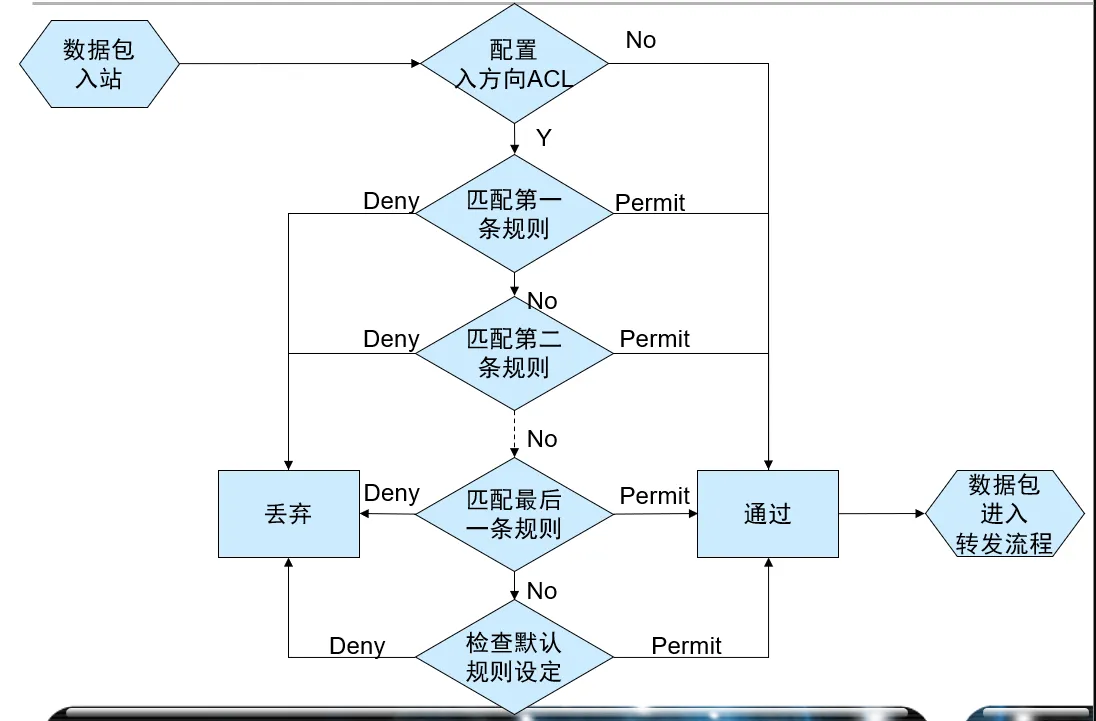
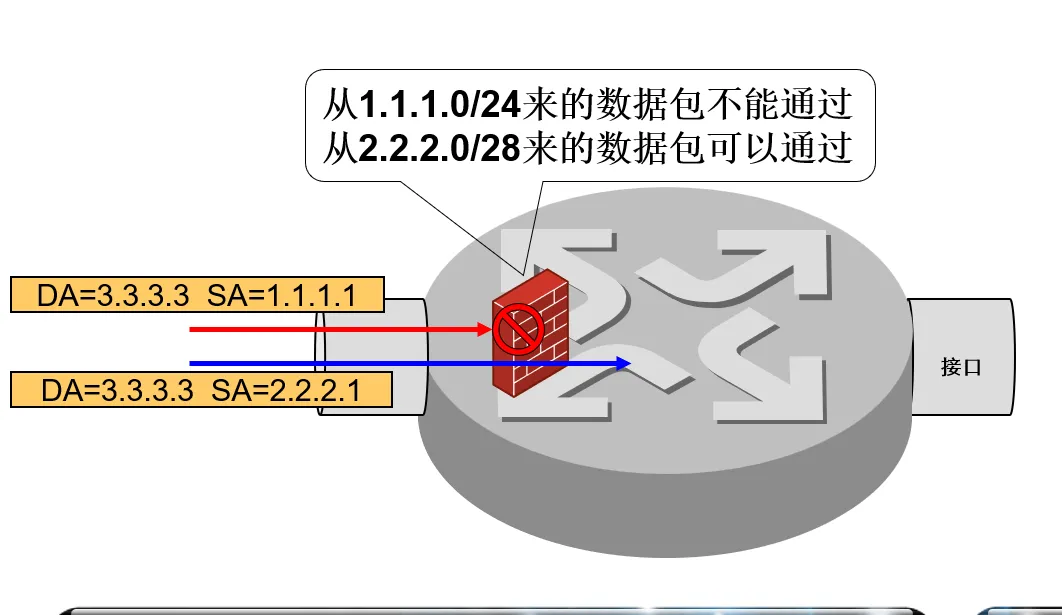
- 访问控制列表 用来实现数据包识别功能。
- ACL 应用在接口上,每个接口的出入双向分别过滤。
- 仅当数据包经过一个接口时,才能被此接口的此方向的 ACL 过滤。
通配符掩码
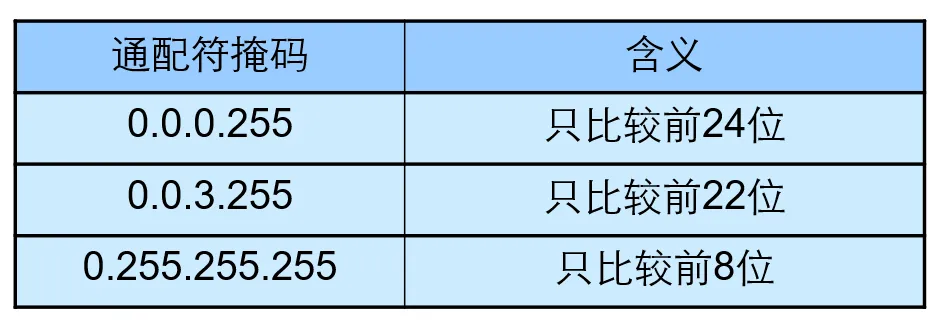
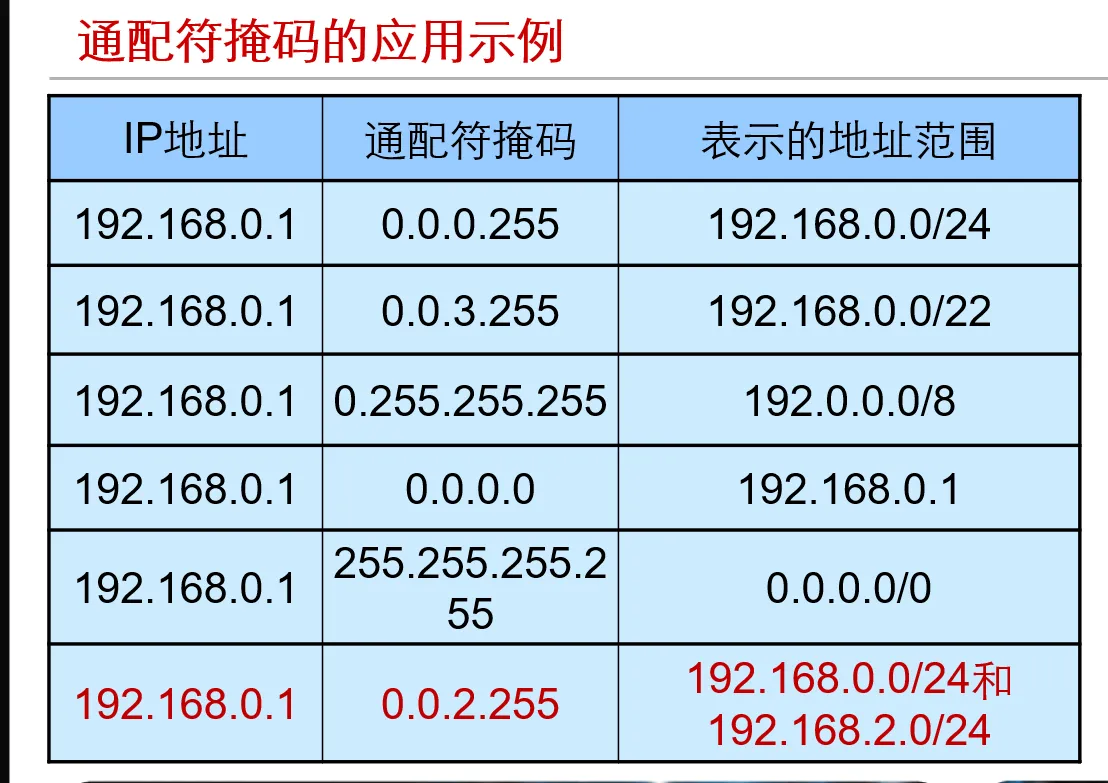
- 通配符掩码和 IP 地址结合使用以描述一个 地址范围
- 通配符掩码的匹配规则:
- 0 表示对应位需比较
- 1 表示对应位不比较
ACL 的标识
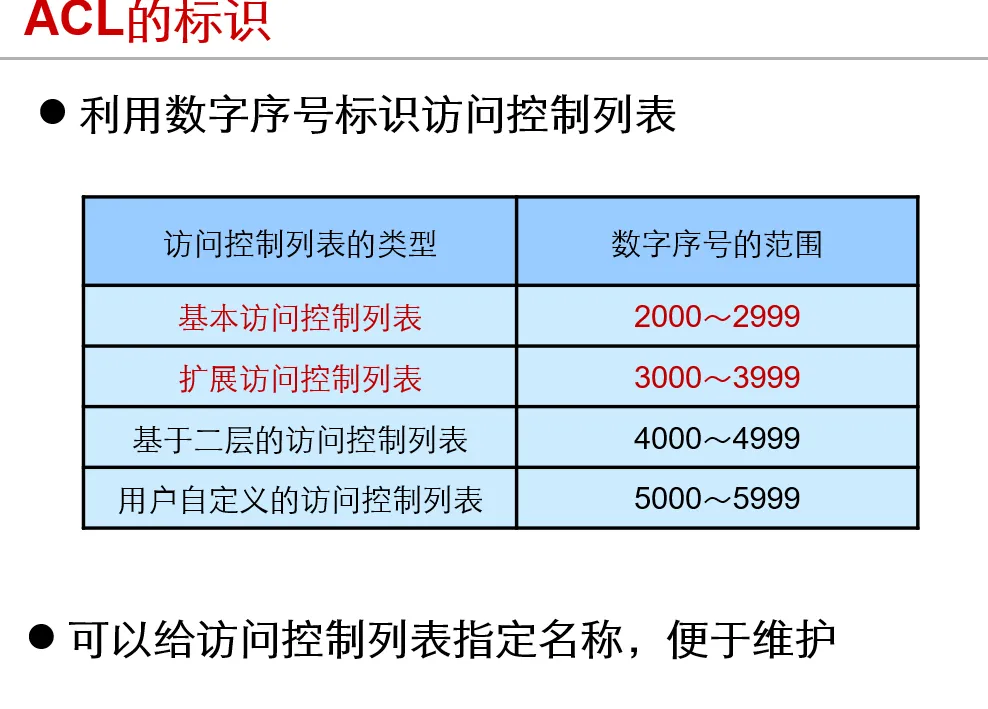
基本 ACL
- 基本访问控制列表只根据报文的 源 IP 地址信息 制定规则
二层 ACL
-
二层 ACL 根据报文的源 MAC 地址、目的 MAC 地址、802.1p 优先级、二层协议类型等二层信息制定匹配规则
-
用户自定义 ACL 可以根据任意位置的任意字串制定匹配规则
- 报文的报文头、IP 头等为基准,指定从第几个字节开始与掩码进行“与”操作,将从报文提取出来的字符串和用户定义的字符串进行比较,找到匹配的报文。(IDS)
配置 ACL 包过滤
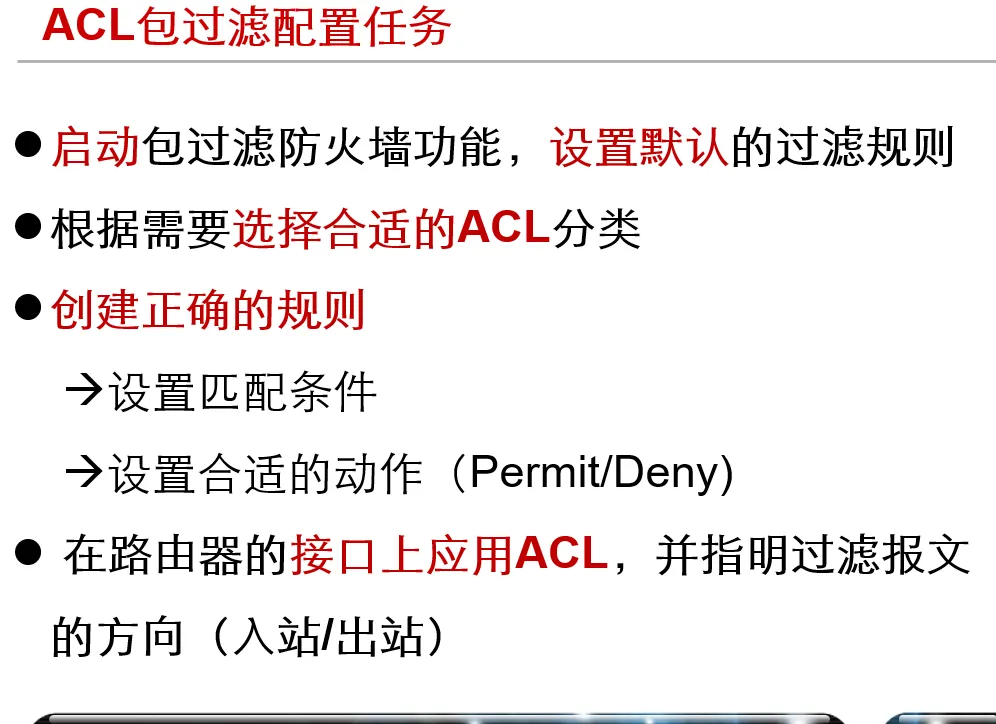
开启防火墙
[sysname] firewall enable

设置防火墙的默认过滤方式
[sysname] firewall default {permit | deny}

配置基本ACL acl-number范围为2000 - 2999
[sysname] acl number acl-number(range 2000 - 2999)

定义规则
 ->制定要匹配的源IP地址范围
 ->指定动作是permit or deny
[sysname-acl-basic-2000] rule [rule-id] {deny | permit} [fragment | logging | source {sour-addr sour-wildcard | any} | time-range time-name]

配置高级IPv4 ACL,并指定ACL序号
[sysname] acl number acl-number

定义规则
需要配置规则来匹配源IP地址、目的IP地址、IP承载的协议类型、协议端口号等信息
指定动作是permit或deny
[sysname-acl-adv-3000] rule [ rule-id ] { deny | permit } protocol [ destination { dest-addr dest-wildcard | any } | destination-port operator port1 [ port2 ] established | fragment | source { sour-addr sour-wildcard | any } | source-port operator port1 [ port2 ] | time-range time-name]


在接口上应用ACL
traffic-filter { inbound | outbound } acl {acl-number}

删除ACL配置
undo acl {acl-number}

删除接口上已应用的ACL配置
undo traffic-filter {inbound | outbound}

ACL的匹配顺序
acl number acl-number [match-order {auto | config}]
- 举例
-
acl number 2000 match-order config rule permit source 1.1.1.0 0.0.0.255 rule deny source 1.1.1.1 0 -
acl number 2000 match-order auto
rule permit source 1.1.1.0 0.0.0.255
rule deny source 1.1.1.1 0
-
基础 ACL 配置
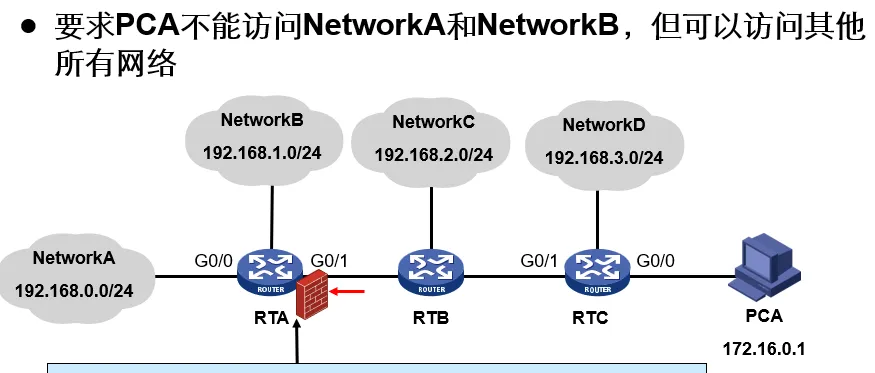
[RTA] firewall enable
[RTA] acl number 2000
[RTA-acl-basic-2000] rule deny source 172.16.0.1 0
[RTA-acl-basic-2000] rule permit source any
[RTA-G0/1] traffic-filter inbound acl 2000
高级 ACL 配置
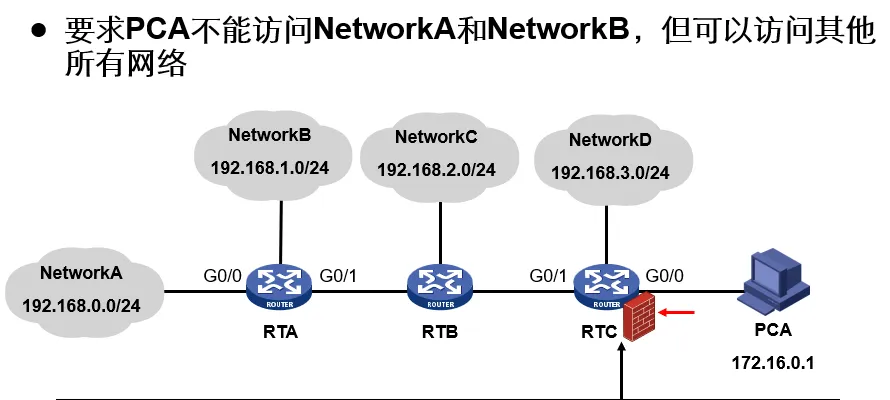
[RTC] firewall enable
[RTC] acl number 3000
[RTC-acl-adv-3000] rule deny ip source 172.16.0.1 0 destination 192.168.0.0 0.0.1.255
[RTC-acl-adv-3000] rule permit ip source any
[RTC-G0/0] traffic-filter inbound acl 3000
高级 ACL 配置 WWW 服务
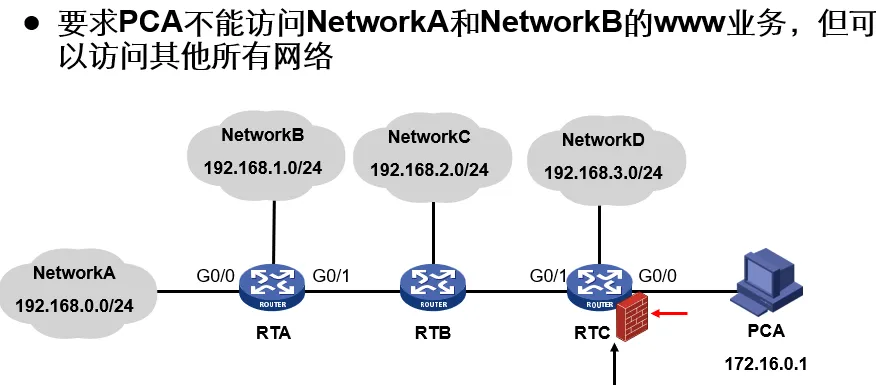
firewall enable
acl number 3000
rule deny tcp source 172.16.0.1 0 destination 192.168.0.0 0.0.1.255 destination-port eq www
rule permit ip source any
int g0/0
traffic-filter inbound acl 3000
高级 ACL 配置 telnet 服务
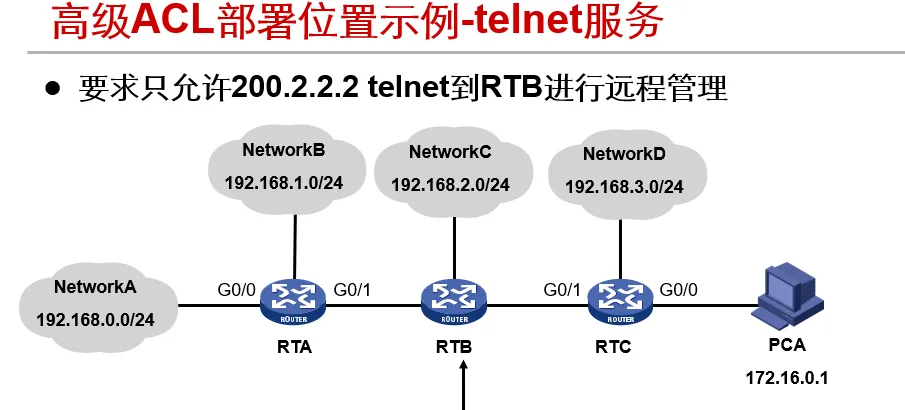
firewall enable
acl number 3000
rule permit tcp source 200.2.2.2 0 destination-port eq 23
rule deny tcp source any destination-port eq 23
int g0/0
traffic-filter inbound acl 3000
int g0/1
traffic-filter inbound acl 3000
int g0/2
traffic-filter inbound acl 3000
[RTB] 的配置
acl number 2000
rule permit source 200.2.2.2 0
rule deny source any
user-interface vty 0 4
acl 2000 inbound
NAT
- NAT(Network Address Translation) ,网络地址转换,一种把内部私有网络地址翻译成合法网络 IP 地址的技术。
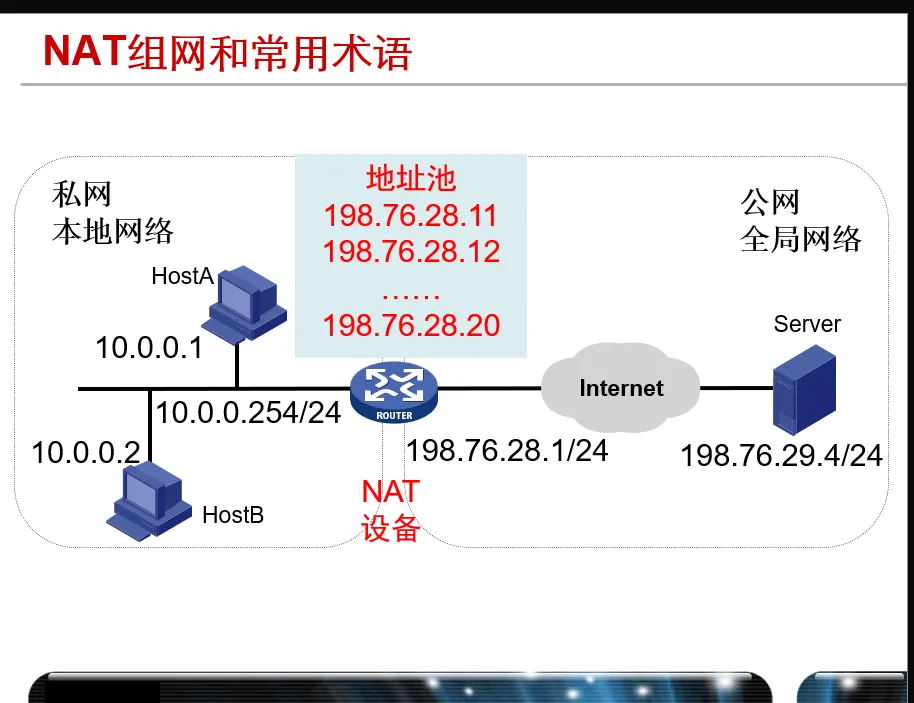
配置 BasicNAT
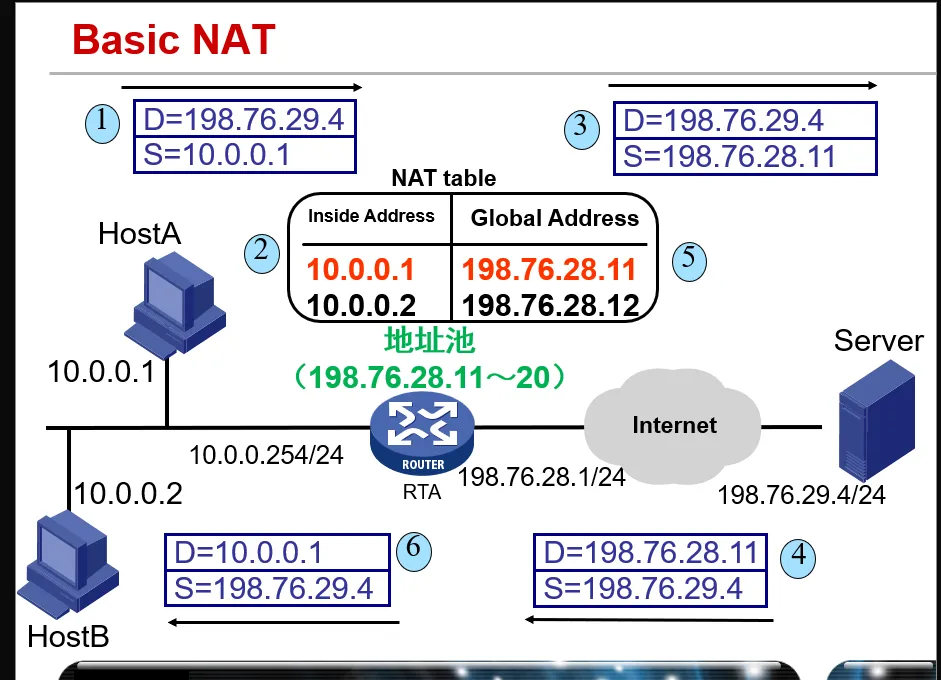
- 配置 ACL
- 用于判断哪些数据包的地址应该被转换
- 被 ACL 允许的报文将被进行 NAT 转换,被拒绝的报文将不会被转换
- 配置地址池
nat address-group group-number start-addr end-addr
- 删除地址池
undo nat address-group group-number
- 配置地址转换
nat outbound acl-number address-group group-number no-pat
Example
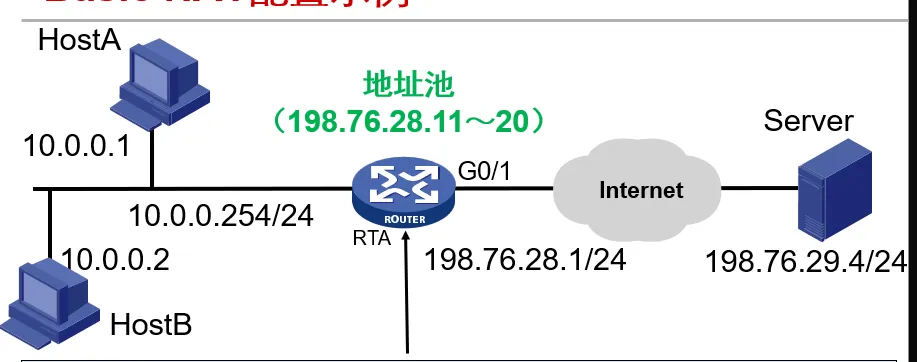
acl number 2000
rule 0 permit source 10.0.0.0 0.0.0.255
nat address-group 1 198.76.29.11 198.76.28.20
int g0/1
nat outbound 2000 address-group 1 no-pat- 先配置一个 ACL 规则,允许所有来自 10.0.0.0 - 10.0.0.255 的所有地址进行通过
- 然后配置一个 nat 地址池包含需要转换为的 ip 地址为 198.78.26.11 - 198.78.26.20 的相关地址
- 最后在 RTA 的 G0/1 的出口方向配置这个 ACL 和地址池
还是上边这个图,我们配置一个 NAPT 来进行实现(地址池变为只有一个 198.78.26.11)
acl number 2000
rule 0 permit source 10.0.0.0 0.0.0.255
nat address-group 1 198.76.28.11
intface g0/1
nat outbound 2000 address-group 1
Easy IP
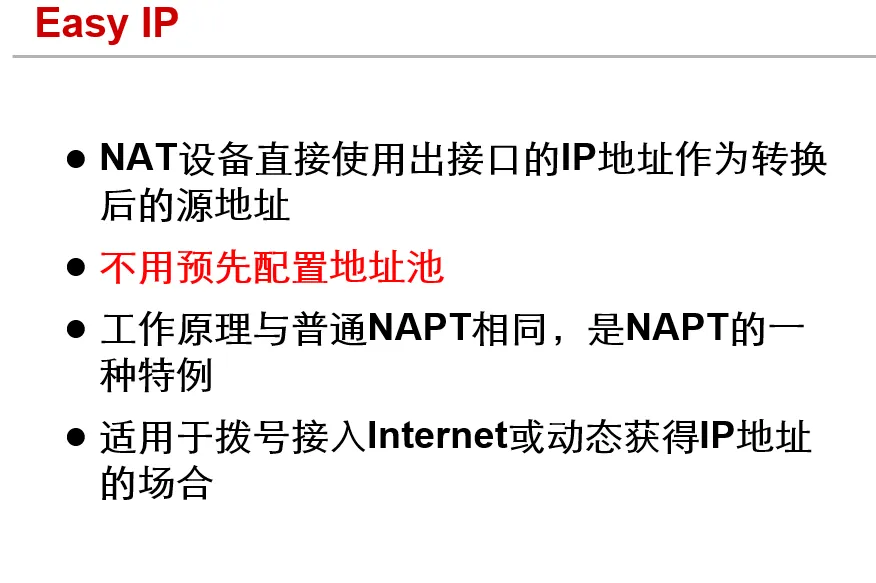
- 配置 ACL
- 用于判断哪些数据包的地址应该被转换
- 被 ACL 允许的报文将被进行 NAT 转换,被拒绝的报文将不会被转换
- 配置地址转换
nat outbound acl-number
- 取消地址转化
undo nat outbound acl-number
Example
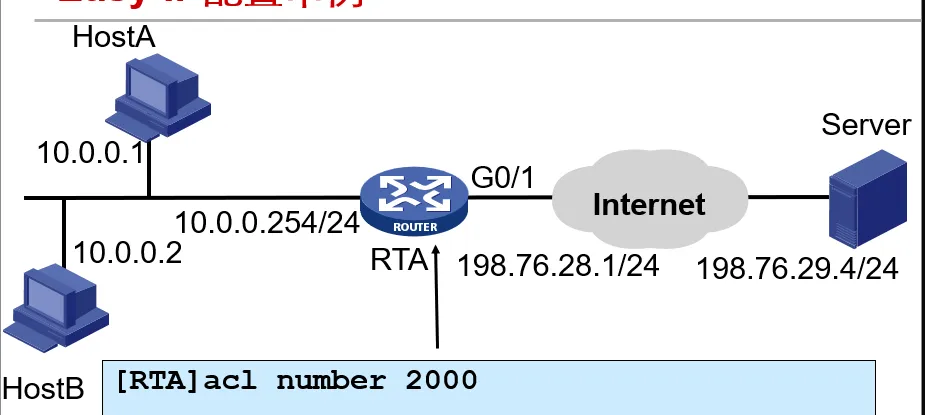
acl number 2000
rule 0 permit source 10.0.0.0 0.0.0.255
intface g0/1
nat outbound 2000- 注意 这里转换后的地址是直接使用 RTA 相应的出接口地址
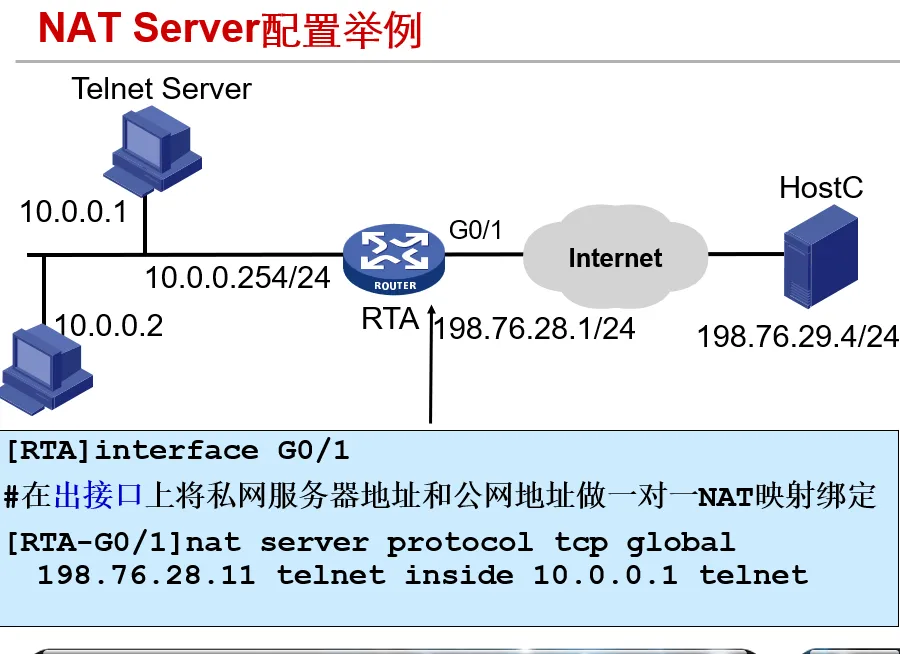
NATServer
- NAT Server 配置命令
nat server protocol pro-type global global-addr [global-port] inside host-addr [host-port]
Example
以太网交换原理
-
交换机 可以隔离 冲突域(交换机两边的设备分别各自构成一个冲突域),集线器 不能隔离冲突域,一个交换机构成一个 广播域,路由器 可以隔离广播域
-
二层交换机可以使用 VLAN(虚拟局域网) 来隔离广播域
VLAN(虚拟局域网)
VLAN 的分类
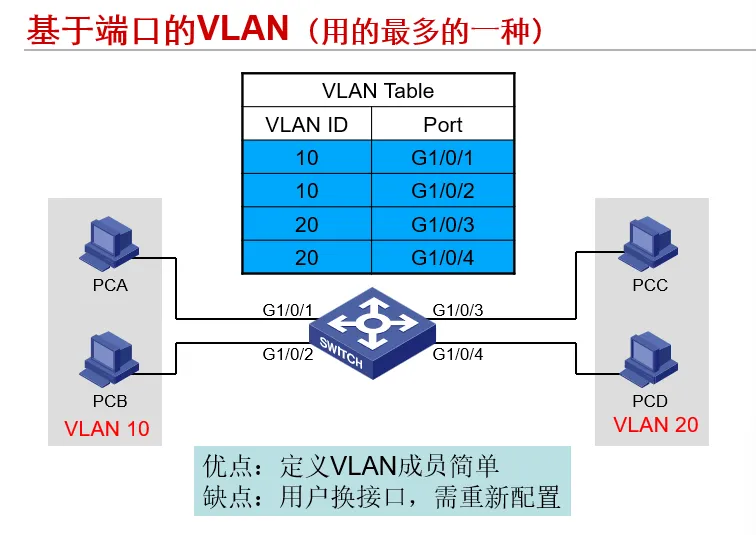
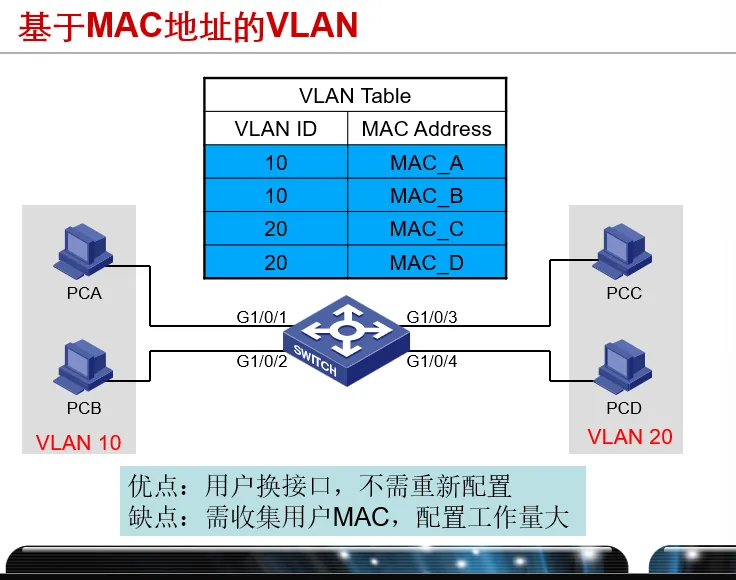
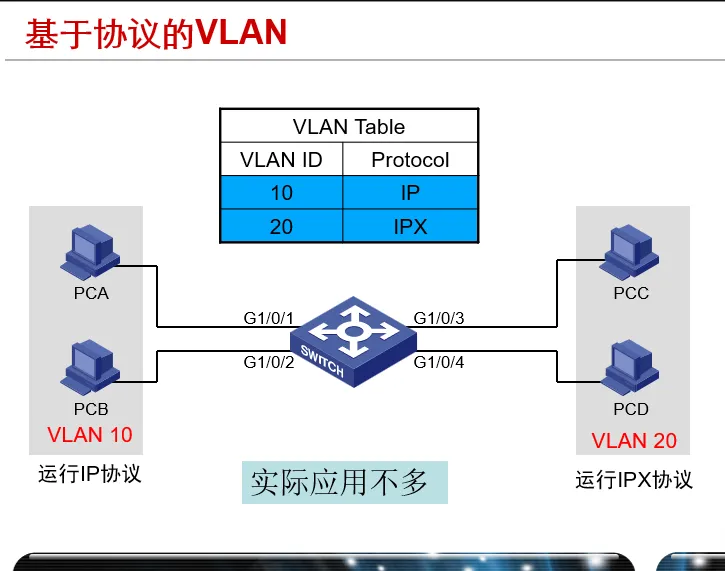
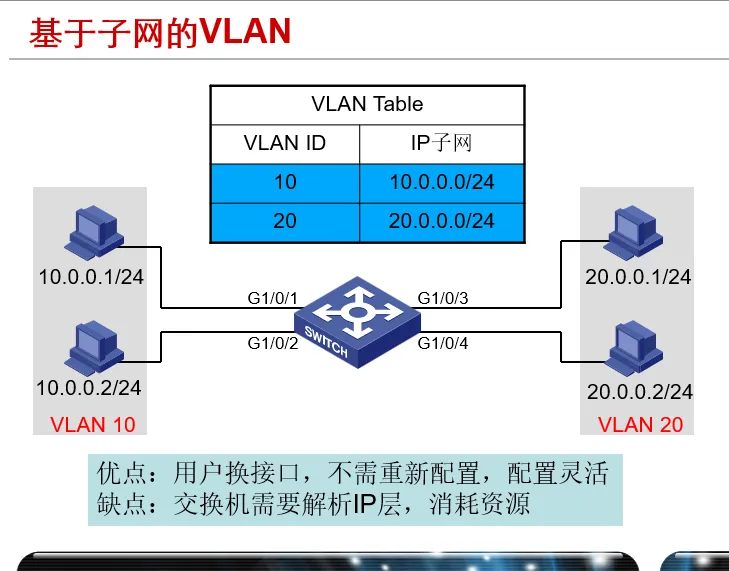
VLAN 技术原理
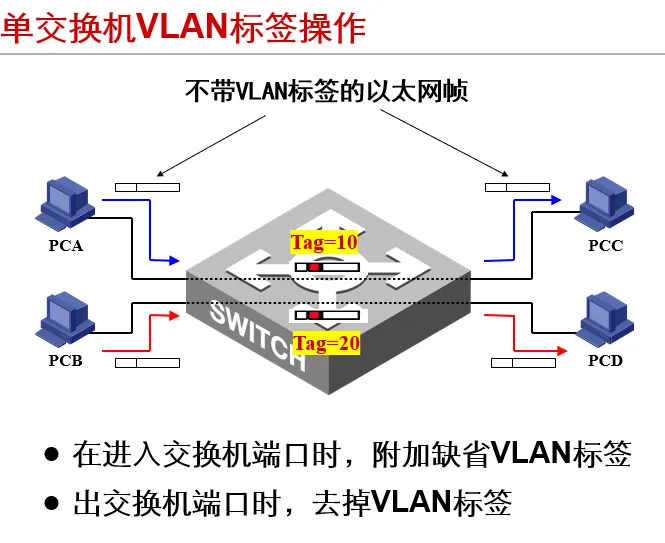
- VLAN 标签: 交换机用 VLAN 标签来区分不同 VLAN 的以太网帧
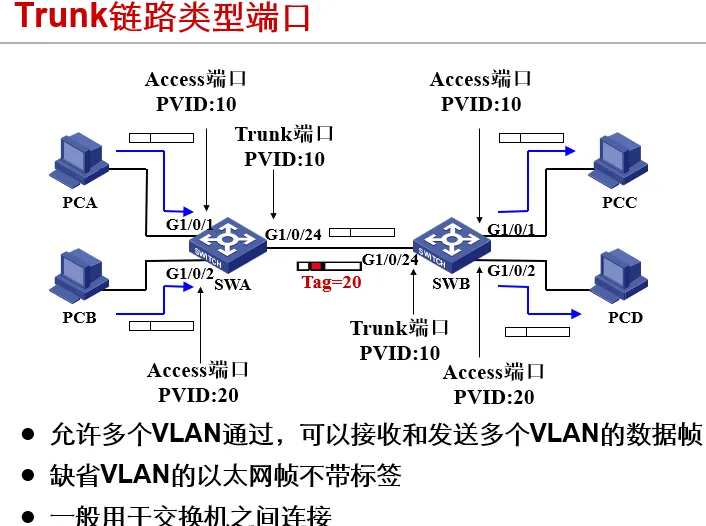
- 1、在进入交换机端口时,添加 VLAN 标签 2、在出交换机端口时,去掉 VLAN 标签 3、VLAN 对主机透明 4、端口所属于的 VLAN 称为默认 VLAN,又称为 PVID(Port VLAN id) 5、只允许默认 VLAN 通过的端口称为 Access 型端口, 仅接收和发送一个 VLAN 的数据帧(默认类型) 6、不对 VLAN 标签进行添加、剥离的端口称为 Trunk 型端口(默认 VLAN 除外) 7、可以接收和发送多个 VLAN 数据帧的称为 Hybrid 端口
Access、Trunk 和 Hybrid 的区别
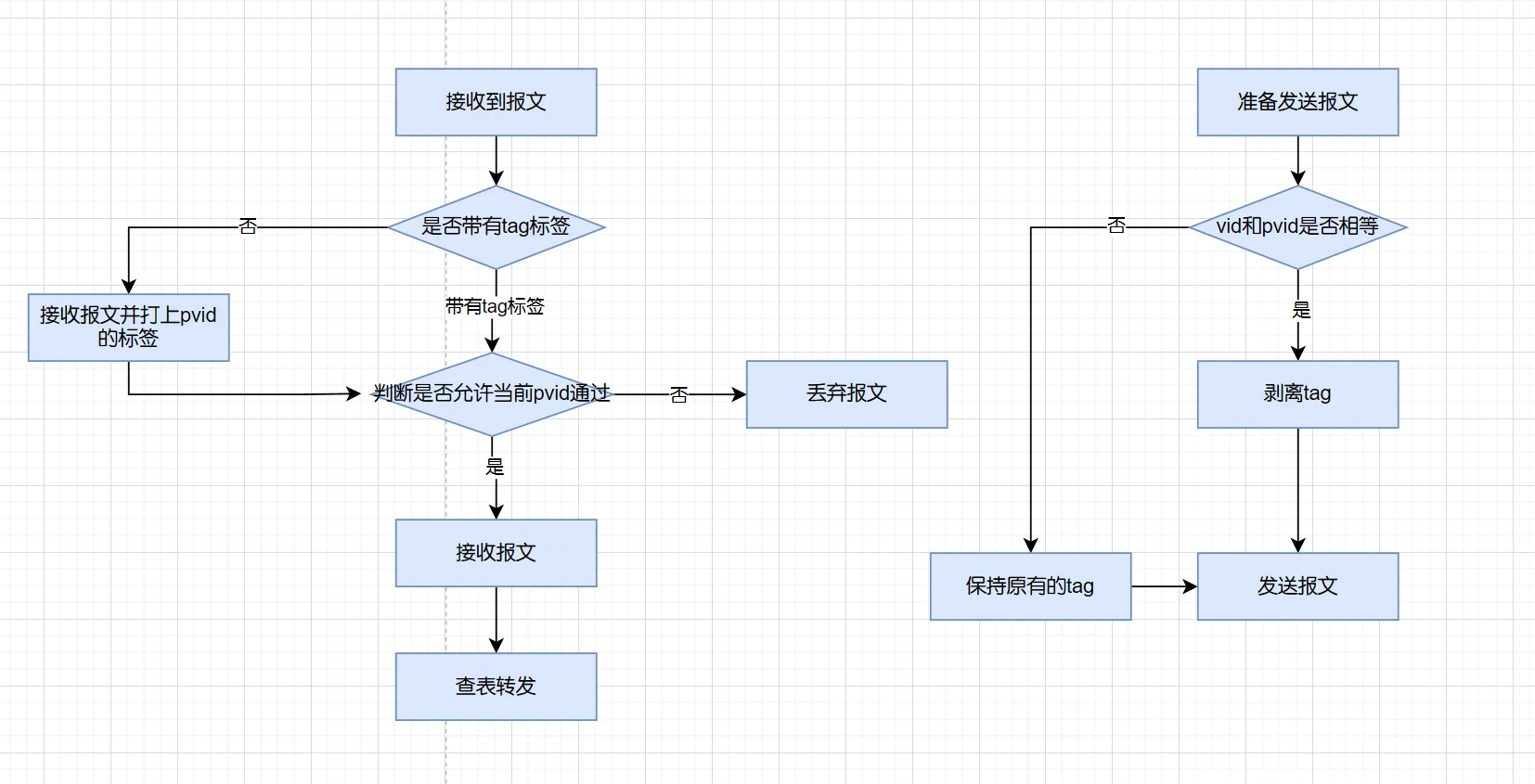
- Trunk 端口可以加入多个 VLAN,即可以允许多个 VLAN 的报文通过。Trunk 端口有一个默认 VLAN ,如果收到的报文没有 VLAN ID,就把这个报文当做默认 VLAN 的报文处理。
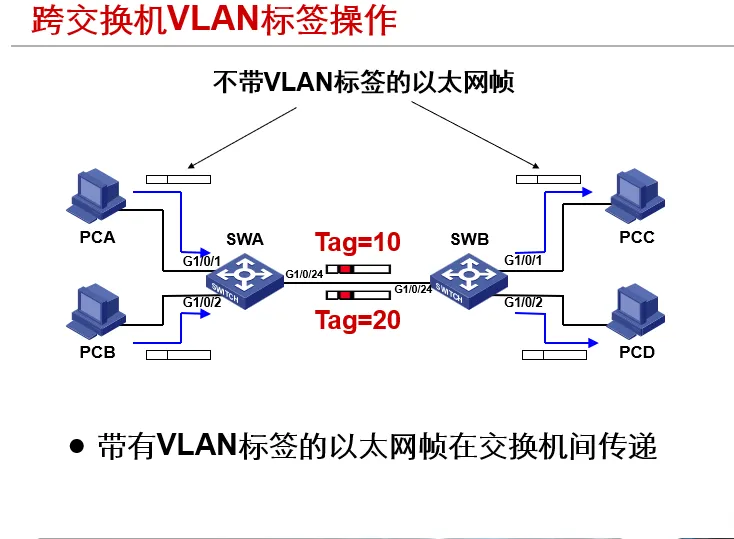
- Trunk 口一般用于连接两台交换机,这样可以只用一条 Trunk 连接实现多个 VLAN 的扩展
- 对于 Trunk 口发送出去的报文,只有默认 VLAN 的报文不带 VLAN ID,其它 VLAN 的报文都要带 VLAN ID
- 简而言之,Trunk 端口的设计目的就是通过一条连接实现多个 VLAN 的跨交换机扩展
- 注意:端口是 Trunk 类型时,两端都应该是 Trunk
VLAN 配置命令(重点)
- 创建 VLAN 并进入 VLAN 视图
[LSW] vlan vlan-id
- 将制定端口加入到当前 VLAN 中
[LSW-vlan10] port interface-list
- 配置端口的链路类型为 Trunk
port link-type trunk
- 允许指定的 VLAN 通过当前的 Trunk 端口
port trunk allow-pass vlan {vlan-list | all}
- 设置 Trunk 端口的缺省 VLAN
port trunk pvid vlan vlan-id
Example
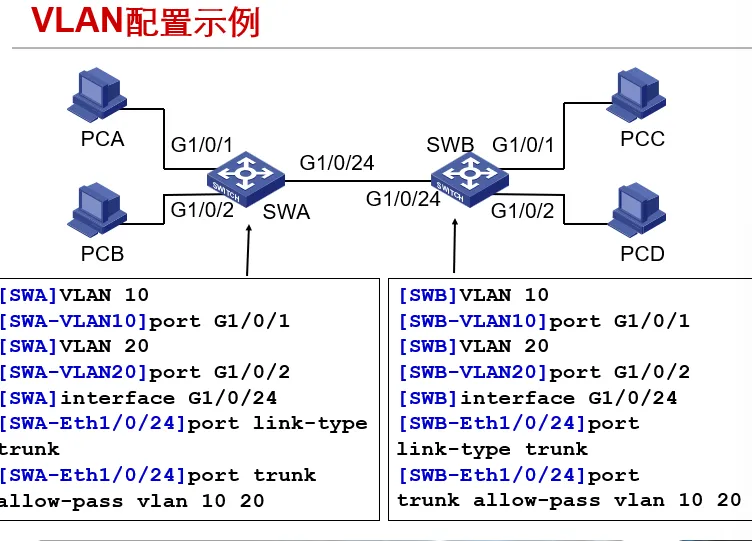
[swa] vlan 10
port g1/0/1
vlan 20
port g1/0/2
int g1/0/24
port link-type trunk
port trunk allow-pass vlan 10 20
[swb] vlan 10
port g1/0/1
vlan 20
port g1/0/2
int g1/0/24
port link-type trunk
port trunk allow-passVlan 考点
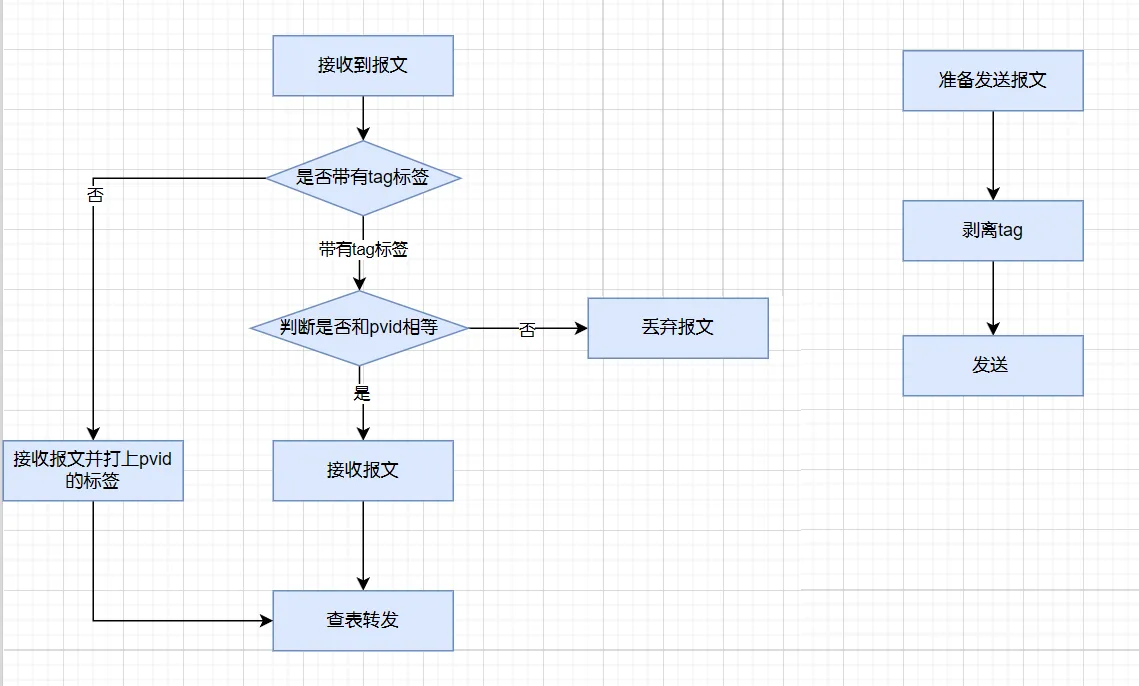
- 在 进入 交换机端口是,会添加 vlan 标签
- 在 出 交换机端口时,去掉 vlan 标签
- vlan 对主机来说是透明的
- 端口所属于的 vlan 称为默认 vlan(这里说一下命令
port default vlan vlan-number),又称为 pvid。 - 只允许默认 vlan 通过的端口称为 Access 端口(
port link-type access),仅接收和发送一个 vlan 的数据帧(默认类型) - 不对 Vlan 标签进行添加和剥离的端口被称为 Trunk 端口(默认 Vlan 除外)
- 就是说如果进行了默认 vlan 配置(
port trunk pvid vlan vlan-id)的 trunk 端口来说对于默认 vlan 来说会进行添加和剥离
- 就是说如果进行了默认 vlan 配置(
- 可以接收和发送多个 vlan 数据帧的称为 Hybrid 端口
下图为 Access 接口
下图为 Trunk 接口 的工作原理
Vlan 间路由的交换方案
三层交换
-
创建/删除 Vlan 虚接口
interface vlan vlan-idundo interface vlan vlan-id
-
配置和删除 VLAN 虚接口的 IP 地址
ip address ip-address {mask | mask-length}undo ip address [ip-address]
-
举例
   vlan 100
   port e0/1 to e0/8
   intface vlan 100
   ip add 1.1.1.254 255.255.255.0
   vlan 200
   port e0/1 to e0/8
   intface vlan 200
   ip add 2.2.2.254 255.255.255.0
单臂路由配置
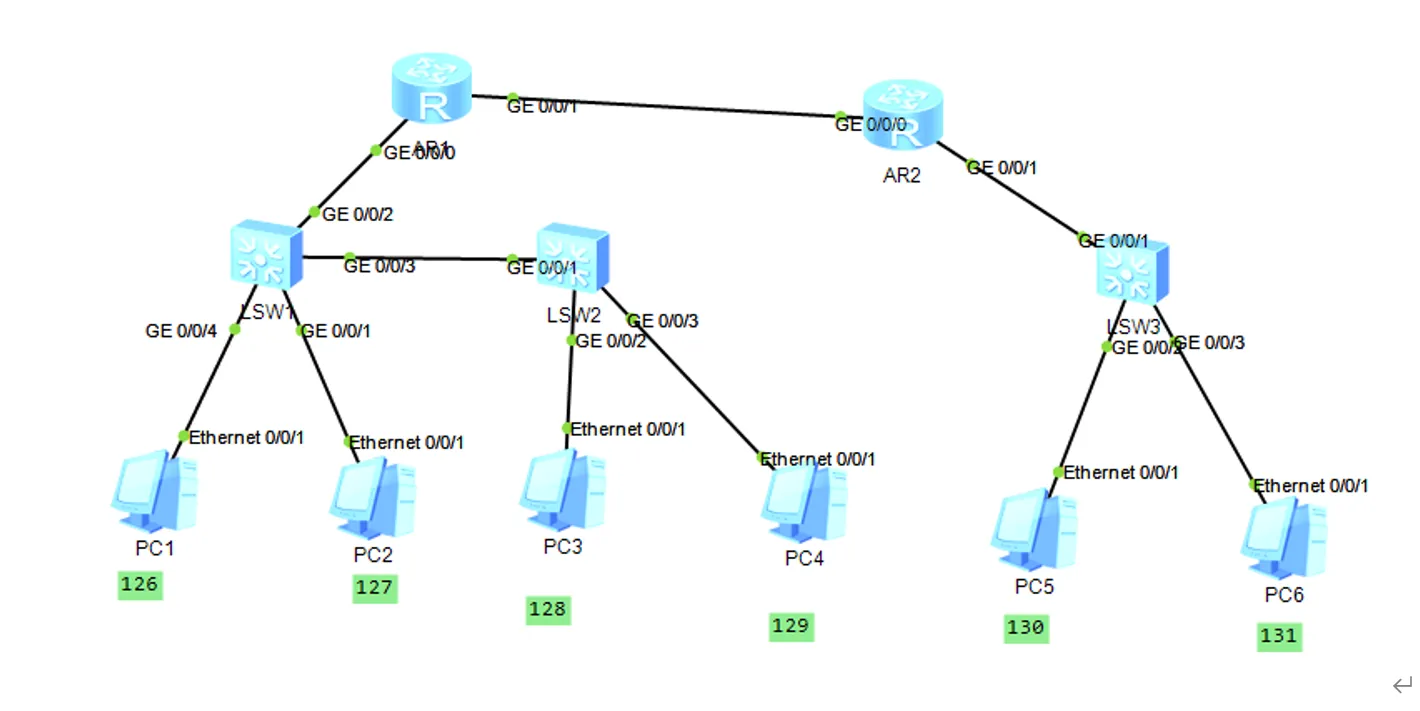
- 在 RT1 配置单臂路由实现 PC1、PC2、PC3 和 PC4 的互通
int g0/0/0
ip add 192.20.126.1 24
int g0/0/0.127
dot1q termination vid 127
ip add 192.20.127.1 24
arp broadcast enable
int g0/0/0.128
dot1q termination vid 128
ip add 192.20.128.1 24
arp broadcast enable
int g0/0/0.129
dot1q termination vid 129
ip add 192.20.129.1 24
arp broadcast enable- 在 RT2 上配置单臂路由实现 PC5 和 PC6 之间的互通
int g0/0/1
ip add 192.20.130.1 24
int g0/0/1.131
dot1q termination vid 131
ip add 192.20.131.1 24
arp broadcast enable- 在 RT1 和 RT2 上配置路由,实现全网互通
RT1:
int loop 0
ip add 1.1.1.1 255.255.255.255
ospf 1
area 0
network 1.1.1.1 0.0.0.0
network 192.20.126.0 0.0.0.255
network 192.20.127.0 0.0.0.255
network 192.20.128.0 0.0.0.255
network 192.20.129.0 0.0.0.255
network 192.20.132.0 0.0.0.255

RT2:
int loop 2
ip add 2.2.2.2 32
ospf 1
area 0
network 2.2.2.2 0.0.0.0
network 192.20.130.0 0.0.0.255
network 192.20.131.0 0.0.0.255
network 192.20.132.0 0.0.0.255
三层交换机配置
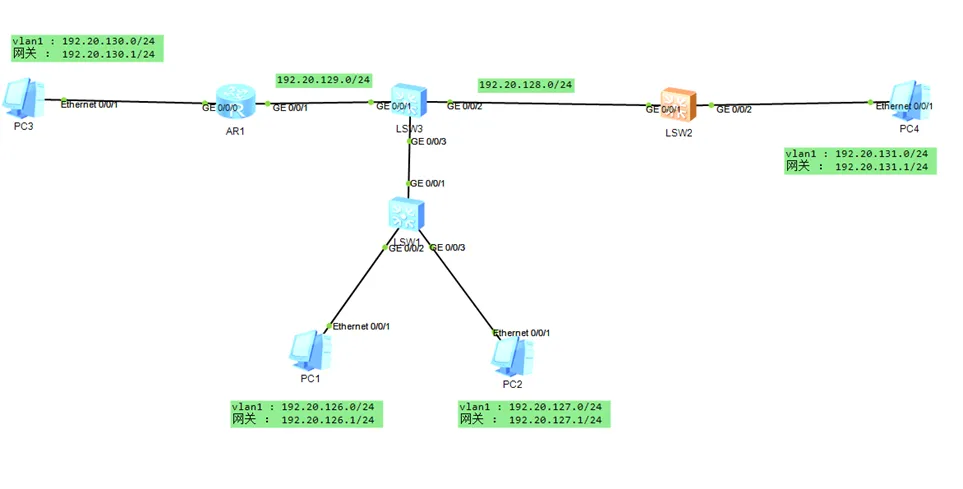
- 如图配置 VLAN 及对应的 IP 地址
LSW3:
int vlanif 126
ip add 192.20.126.1 24
int vlanif 127
ip add 192.20.127.1 24
int vlanif 128
ip add 192.20.128.1 24
int vlanif 129
ip add 192.20.128.1 24
vlan batch 126 to 129
int g0/0/2
port link-type access
port default vlan 129
int g0/0/1
port link-type access
port default vlan 128
int g0/0/3
port link-type trunk
port trunk allow-pass vlan all
PPP
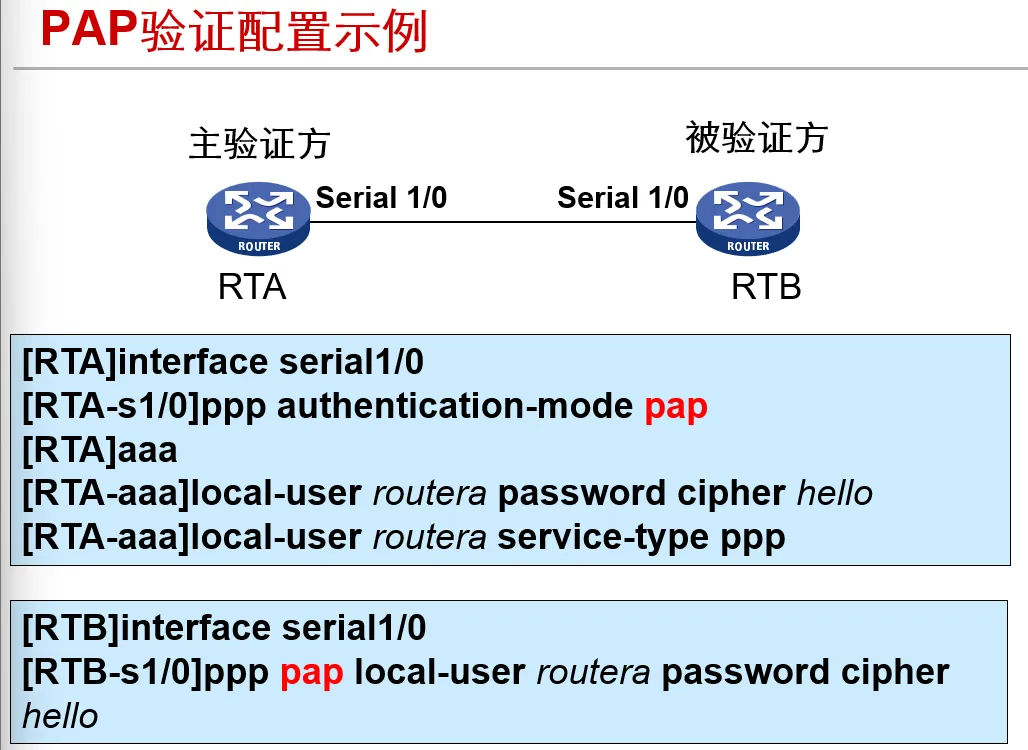
- 配置 PAP 验证
主验证方
ppp authentication-mode pap
local-user wtc password {cipher | simple} 123
local-user wtc service-type ppp

被验证方
ppp pap local-user wtc password cipher 123- 配置 CHAP 认证
主验证方
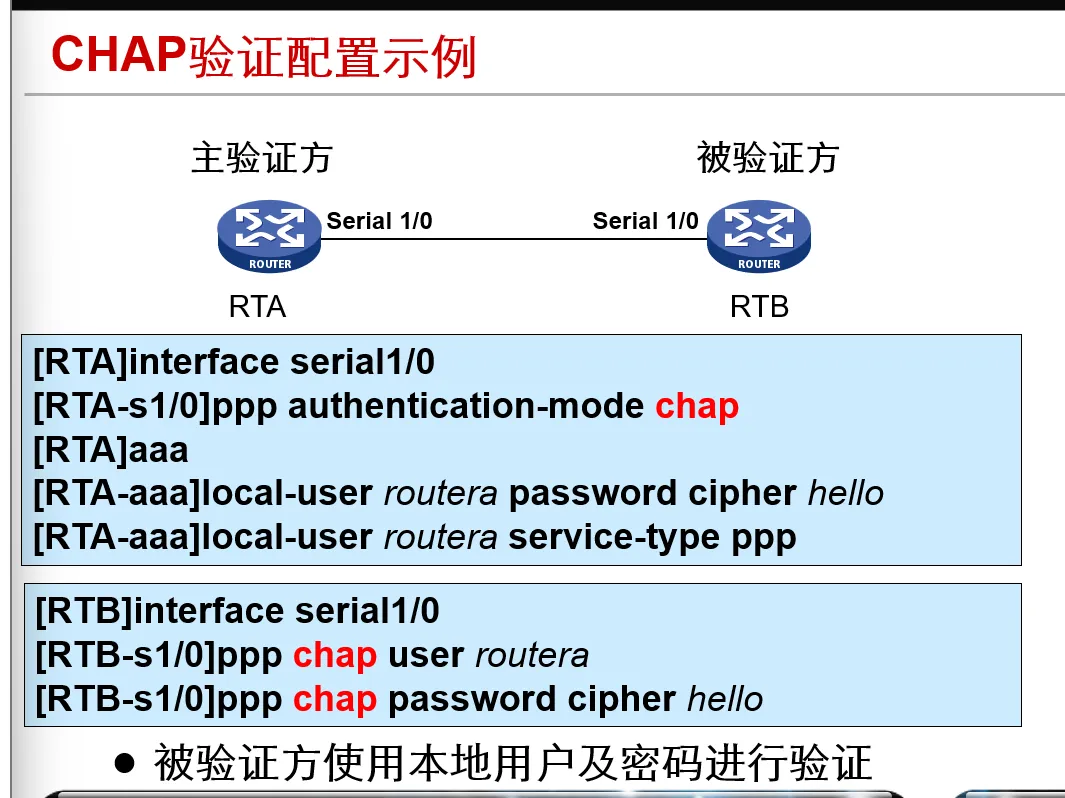
ppp authentication-mode chap
local-user wtc password cipher 123
local-user wtc service-type ppp

被验证方
ppp chap user wtc
ppp chap password cipher 123
PAP 验证配置举例
CHAP 验证配置举例